
unity实现cloudflarer2存储管理
实现效果: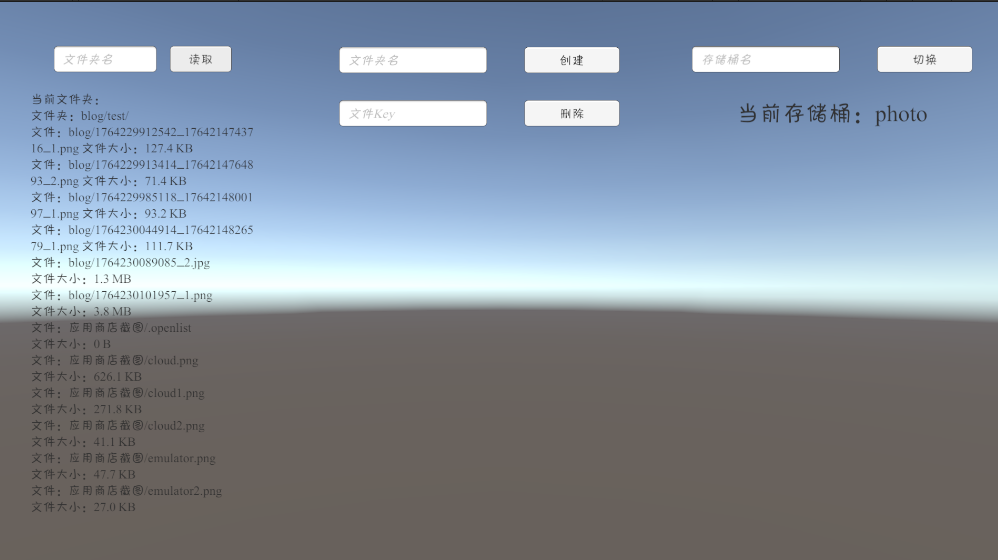
R2UnityWebClient.cs:
using System;
using System.Collections;
using System.Collections.Generic;
using System.Text;
using UnityEngine;
using UnityEngine.Networking;
using UnityEngine.UI;

public class R2UnityWebClient : MonoBehaviour
{
    //界面
    InputField _InputListFolerName;
    Button _BtnListFiles;
    Text _LabFiles;
    StringBuilder _SbFiles=new StringBuilder();
    InputField _InputFolerName;
    Button _BtnCreateFolder;
    InputField _InputKey;
    Button _BtnDel;
    InputField _InputBucket;
    Button _BtnChange;
    Text _LabBucket;

    [Header("R2 配置")]
    public string accountId = "accountId";
    public string apiToken = "apiToken";
    public string bucketName = "defaultbucket";

    private string _apiBaseUrl;
    private void Awake()
    {
        _InputListFolerName=transform.Find("InputListFolerName").GetComponent<InputField>();
        _BtnListFiles = transform.Find("BtnListFiles").GetComponent<Button>();
        _LabFiles = transform.Find("LabFiles").GetComponent<Text>();
        _InputFolerName = transform.Find("InputFolerName").GetComponent<InputField>();
        _BtnCreateFolder = transform.Find("BtnCreateFolder").GetComponent<Button>();
        _InputKey = transform.Find("InputKey").GetComponent<InputField>();
        _BtnDel = transform.Find("BtnDel").GetComponent<Button>();
        _InputBucket = transform.Find("InputBucket").GetComponent<InputField>();
        _BtnChange = transform.Find("BtnChange").GetComponent<Button>();
        _LabBucket = transform.Find("LabBucket").GetComponent<Text>();
    }

    void Start()
    {
        _BtnListFiles.onClick.AddListener(ListRootContents);
        _BtnChange.onClick.AddListener(ChangeBucket);
        _BtnCreateFolder.onClick.AddListener(CreateFolder);
        _BtnDel.onClick.AddListener(DelFile);
        // 初始化API基础URL
        UpdateAPI();
        UpdateBucket();
        Debug.Log($"R2客户端初始化完成,基础URL: {_apiBaseUrl}");
    }
    void DelFile()
    {
        if (string.IsNullOrWhiteSpace(_InputKey.text))
        {
            Debug.LogError("禁止直接删除根目录");
            return;
        }
        DeleteFile(_InputKey.text, (isFinsh, key) =>
        {
            if (isFinsh)
            {
                _InputKey.text = "";
                Debug.Log("文件删除完成:" + key);
            }
            else
            {
                Debug.Log("文件删除失败:" + key);
            }
        });
    }
    void CreateFolder()
    {
        CreateFolder(_InputFolerName.text, (isFinsh, key) =>
        {
            if (isFinsh)
            {
                _InputFolerName.text = "";
                Debug.Log("文件夹创建完成:" + key);
            }
            else
            {
                Debug.Log("文件夹创建失败:" + key);
            }
        });
    }
    void UpdateAPI()
    {
        _apiBaseUrl = $"https://api.cloudflare.com/client/v4/accounts/{accountId}/r2/buckets/{bucketName}";
    }
    void ChangeBucket()
    {
        bucketName = _InputBucket.text;
        UpdateAPI();
        UpdateBucket();
    }
    void UpdateBucket()
    {
        _LabBucket.text = "当前存储桶:" + bucketName;
    }
    void ListRootContents()
    {
        _SbFiles.Clear();
        _SbFiles.AppendLine("当前文件夹:" + _InputListFolerName.text);
        Debug.Log("正在列出"+ _InputListFolerName.text + "内容...");

        ListBucketContents(_InputListFolerName.text,false, (success, files, folders) =>
        {
            if (success)
            {
                Debug.Log($"找到 {files.Count} 个文件,{folders.Count} 个文件夹");

                foreach (var folder in folders)
                {
                    _SbFiles.AppendLine("文件夹:"+folder);
                }

                foreach (var file in files)
                {
                    _SbFiles.AppendLine("文件:" + file.key+" 文件大小:"+file.GetFormattedSize());
                }
            }
            else
            {
                Debug.LogError("列出内容失败");
            }
            _LabFiles.text= _SbFiles.ToString();
        });
    }
    /// <summary>
    /// 通用请求协程,处理所有R2 API调用
    /// </summary>
    private IEnumerator SendRequestCoroutine(UnityWebRequest request, Action<bool, string, byte[]> callback)
    {
        // 设置认证头
        request.SetRequestHeader("Authorization", $"Bearer {apiToken}");
        request.SetRequestHeader("Content-Type", "application/json");

        // 发送请求
        yield return request.SendWebRequest();

        bool success = false;
        string error = "";
        byte[] data = null;

        // 检查结果
        if (request.result == UnityWebRequest.Result.Success)
        {
            success = true;
            data = request.downloadHandler.data;
            Debug.Log($"请求成功: {request.url}");
        }
        else
        {
            error = $"请求失败 ({request.result}): {request.error}";
            if (request.downloadHandler != null && !string.IsNullOrEmpty(request.downloadHandler.text))
            {
                error += $"\n响应: {request.downloadHandler.text}";
            }
            Debug.LogError(error);
        }

        // 调用回调
        callback?.Invoke(success, error, data);

        // 清理请求
        request.Dispose();
    }

    // ========== 核心功能实现 ==========

    /// <summary>
    /// 1. 上传文件到R2
    /// </summary>
    public void UploadFile(string objectKey, byte[] fileData, string contentType, Action<bool, string> callback)
    {
        StartCoroutine(UploadFileCoroutine(objectKey, fileData, contentType, callback));
    }

    private IEnumerator UploadFileCoroutine(string objectKey, byte[] fileData, string contentType, Action<bool, string> callback)
    {
        string url = $"{_apiBaseUrl}/objects/{Uri.EscapeDataString(objectKey)}";

        UnityWebRequest request = new UnityWebRequest(url, "PUT");
        request.uploadHandler = new UploadHandlerRaw(fileData);
        request.downloadHandler = new DownloadHandlerBuffer();
        request.SetRequestHeader("Content-Type", contentType);

        yield return StartCoroutine(SendRequestCoroutine(request, (success, error, data) =>
        {
            if (success)
            {
                Debug.Log($"文件上传成功: {objectKey}");
                callback?.Invoke(true, "上传成功");
            }
            else
            {
                callback?.Invoke(false, $"上传失败: {error}");
            }
        }));
    }

    ///// <summary>
    ///// 2. 列出文件和文件夹
    ///// </summary>
    public void ListBucketContents(string prefix, bool includeFolders = true,
                                   Action<bool, List<FileDetail>, List<string>> callback = null)
    {
        StartCoroutine(ListBucketContentsCoroutine(prefix, includeFolders, callback));
    }

    private IEnumerator ListBucketContentsCoroutine(string prefix, bool includeFolders,
                                                    Action<bool, List<FileDetail>, List<string>> callback)
    {
        // 构建查询
        string query = includeFolders ? "?delimiter=/" : "";
        if (!string.IsNullOrEmpty(prefix))
        {
            query += (query.Length > 0 ? "&" : "?") + $"prefix={Uri.EscapeDataString(prefix)}";
        }

        string url = $"{_apiBaseUrl}/objects{query}";
        UnityWebRequest request = UnityWebRequest.Get(url);

        yield return StartCoroutine(SendRequestCoroutine(request, (success, error, data) =>
        {
            List<FileDetail> fileDetails = new List<FileDetail>();
            List<string> folderPaths = new List<string>();

            if (success && data != null)
            {
                string json = Encoding.UTF8.GetString(data);
                try
                {
                    var response = JsonUtility.FromJson<R2ApiResponse>(json);

                    if (response != null && response.success && response.result != null)
                    {
                        foreach (var obj in response.result)
                        {
                            var detail = new FileDetail
                            {
                                key = obj.key,
                                size = obj.size,
                                lastModified = obj.last_modified,
                                contentType = obj.http_metadata?.contentType ?? "未知"
                            };

                            // 判断是文件还是文件夹
                            if (obj.key.EndsWith("/") && obj.size == 0)
                            {
                                folderPaths.Add(obj.key);
                            }
                            else
                            {
                                fileDetails.Add(detail);
                            }
                        }

                        Debug.Log($"成功列出: {fileDetails.Count} 个文件, {folderPaths.Count} 个文件夹");
                        callback?.Invoke(true, fileDetails, folderPaths);
                        return;
                    }
                }
                catch (Exception e)
                {
                    Debug.LogWarning($"第一种解析方式失败,尝试备用方案: {e.Message}");
                }

                // 备用方案:手动解析
                try
                {
                    // 简单的字符串查找(应急方案)
                    int startPos = json.IndexOf("\"result\":[");
                    if (startPos > 0)
                    {
                        // ... 这里可以添加简单的手动解析逻辑
                    }
                }
                catch (Exception e)
                {
                    Debug.LogError($"所有解析方式都失败: {e.Message}");
                }
            }

            callback?.Invoke(false, fileDetails, folderPaths);
        }));
    }

    // 文件详情类
    [System.Serializable]
    public class FileDetail
    {
        public string key;
        public long size;
        public string lastModified;
        public string contentType;

        public string GetFormattedSize()
        {
            if (size < 1024) return $"{size} B";
            else if (size < 1024 * 1024) return $"{(size / 1024.0):F1} KB";
            else if (size < 1024 * 1024 * 1024) return $"{(size / (1024.0 * 1024.0)):F1} MB";
            else return $"{(size / (1024.0 * 1024.0 * 1024.0)):F2} GB";
        }
    }
    /// <summary>
    /// 3. 删除文件
    /// </summary>
    public void DeleteFile(string objectKey, Action<bool, string> callback)
    {
        StartCoroutine(DeleteFileCoroutine(objectKey, callback));
    }

    private IEnumerator DeleteFileCoroutine(string objectKey, Action<bool, string> callback)
    {
        string url = $"{_apiBaseUrl}/objects/{Uri.EscapeDataString(objectKey)}";
        UnityWebRequest request = UnityWebRequest.Delete(url);

        yield return StartCoroutine(SendRequestCoroutine(request, (success, error, data) =>
        {
            if (success)
            {
                Debug.Log($"文件删除成功: {objectKey}");
                callback?.Invoke(true, "删除成功");
            }
            else
            {
                callback?.Invoke(false, $"删除失败: {error}");
            }
        }));
    }

    /// <summary>
    /// 4. 移动/重命名文件
    /// </summary>
    public void MoveFile(string sourceKey, string destinationKey, Action<bool, string> callback)
    {
        StartCoroutine(MoveFileCoroutine(sourceKey, destinationKey, callback));
    }

    private IEnumerator MoveFileCoroutine(string sourceKey, string destinationKey, Action<bool, string> callback)
    {
        // 第一步:复制文件
        string copyUrl = $"{_apiBaseUrl}/objects/{Uri.EscapeDataString(sourceKey)}/copy";

        var copyBody = new CopyRequest { destination_key = destinationKey };
        string jsonBody = JsonUtility.ToJson(copyBody);

        UnityWebRequest copyRequest = new UnityWebRequest(copyUrl, "POST");
        byte[] bodyRaw = Encoding.UTF8.GetBytes(jsonBody);
        copyRequest.uploadHandler = new UploadHandlerRaw(bodyRaw);
        copyRequest.downloadHandler = new DownloadHandlerBuffer();
        copyRequest.SetRequestHeader("Content-Type", "application/json");

        bool copySuccess = false;

        yield return StartCoroutine(SendRequestCoroutine(copyRequest, (success, error, data) =>
        {
            copySuccess = success;
            if (!success)
            {
                callback?.Invoke(false, $"复制失败: {error}");
            }
        }));

        if (!copySuccess) yield break;

        // 第二步:删除原文件
        yield return StartCoroutine(DeleteFileCoroutine(sourceKey, (deleteSuccess, deleteMessage) =>
        {
            if (deleteSuccess)
            {
                Debug.Log($"文件移动成功: {sourceKey} -> {destinationKey}");
                callback?.Invoke(true, "移动成功");
            }
            else
            {
                callback?.Invoke(false, $"移动失败(删除原文件时出错): {deleteMessage}");
            }
        }));
    }

    /// <summary>
    /// 5. 创建文件夹(上传一个空对象)
    /// </summary>
    public void CreateFolder(string folderPath, Action<bool, string> callback)
    {
        // 确保文件夹路径以斜杠结尾
        if (!folderPath.EndsWith("/"))
        {
            folderPath += "/";
        }

        // 上传空内容作为文件夹标记
        byte[] emptyData = new byte[0];
        UploadFile(folderPath, emptyData, "application/x-directory", callback);
    }

    /// <summary>
    /// 6. 下载文件
    /// </summary>
    public void DownloadFile(string objectKey, Action<bool, byte[], string> callback)
    {
        StartCoroutine(DownloadFileCoroutine(objectKey, callback));
    }

    private IEnumerator DownloadFileCoroutine(string objectKey, Action<bool, byte[], string> callback)
    {
        string url = $"{_apiBaseUrl}/objects/{Uri.EscapeDataString(objectKey)}";
        UnityWebRequest request = UnityWebRequest.Get(url);

        yield return StartCoroutine(SendRequestCoroutine(request, (success, error, data) =>
        {
            if (success && data != null)
            {
                callback?.Invoke(true, data, "下载成功");
            }
            else
            {
                callback?.Invoke(false, null, $"下载失败: {error}");
            }
        }));
    }

    /// <summary>
    /// 7. 获取文件信息(大小、修改时间等)
    /// </summary>
    public void GetFileInfo(string objectKey, Action<bool, FileInfo> callback)
    {
        StartCoroutine(GetFileInfoCoroutine(objectKey, callback));
    }

    private IEnumerator GetFileInfoCoroutine(string objectKey, Action<bool, FileInfo> callback)
    {
        string url = $"{_apiBaseUrl}/objects/{Uri.EscapeDataString(objectKey)}";
        UnityWebRequest request = UnityWebRequest.Head(url); // 使用HEAD请求只获取元数据

        yield return StartCoroutine(SendRequestCoroutine(request, (success, error, data) =>
        {
            if (success)
            {
                FileInfo info = new FileInfo
                {
                    key = objectKey,
                    size = long.Parse(request.GetResponseHeader("Content-Length") ?? "0"),
                    lastModified = request.GetResponseHeader("Last-Modified"),
                    contentType = request.GetResponseHeader("Content-Type")
                };

                callback?.Invoke(true, info);
            }
            else
            {
                callback?.Invoke(false, null);
            }
        }));
    }
}

// ========== 数据模型类 ==========

// 替换掉你原来的 R2ListResponse, ListResult 等类
[System.Serializable]
public class R2ApiResponse
{
    public bool success;
    public List<R2Object> result; // 注意:这里直接就是对象列表,不是嵌套结构
    public List<object> errors;
    public List<object> messages;
}

[System.Serializable]
public class R2Object
{
    public string key;
    public long size;
    public string last_modified; // 注意API返回的是下划线格式
    public string etag;
    public HttpMetadata http_metadata;
    public Dictionary<string, string> custom_metadata;
    public string storage_class;
}

[System.Serializable]
public class HttpMetadata
{
    public string contentType;
    // 可能还有其他HTTP元数据字段
}

// 注意:API在添加 delimiter=“/” 参数时,才会返回 common_prefixes 来表示文件夹
// 这种情况的响应结构不同,需要单独处理
[System.Serializable]
public class R2ListWithPrefixesResponse
{
    public bool success;
    public ListWithPrefixesResult result;
    public List<object> errors;
    public List<object> messages;
}

[System.Serializable]
public class ListWithPrefixesResult
{
    public List<R2Object> objects; // 或者可能是 contents
    public List<CommonPrefix> common_prefixes;
}

[System.Serializable]
public class CommonPrefix
{
    public string prefix;
}

[System.Serializable]
public class CopyRequest
{
    public string destination_key;
}

[System.Serializable]
public class FileInfo
{
    public string key;
    public long size;
    public string lastModified;
    public string contentType;
}
下载Demo:
https://photo.lovekeli.uk/blog/cloudflareR2.unitypackage